The Schedule Grid: Your Interactive Time Matrix
The heart of your daily work: a powerful time matrix where rows represent employees or customers and columns represent the days.
How it works
- Drag & drop: Move shifts directly with the mouse from one person to the next; the fill handle also lets you copy an entry onto further days in the same row.
- Real time: Changes appear instantly for everyone who has the same schedule open. Two planners can work at the same time — conflicts are detected instead of silently overwriting each other.
- Everything in view: Qualifications and locks are flagged right in the grid, and Klacks additionally reports conflicts in a dedicated overview — you see immediately when an assignment isn't allowed.
- Fast: The grid is built for large schedules; even hundreds of employees across a full month stay smooth to work with.
Good to know
- Cells outside a person's group membership or contract period are grayed out and cannot be scheduled — so no assignments happen by accident.
- The grid and auto-planning work hand in hand: let it fill automatically first, then fine-tune by hand.
- Depending on the approval level of the individual entries, editing may be locked — see Approval Workflow: From Draft to Binding Schedule.
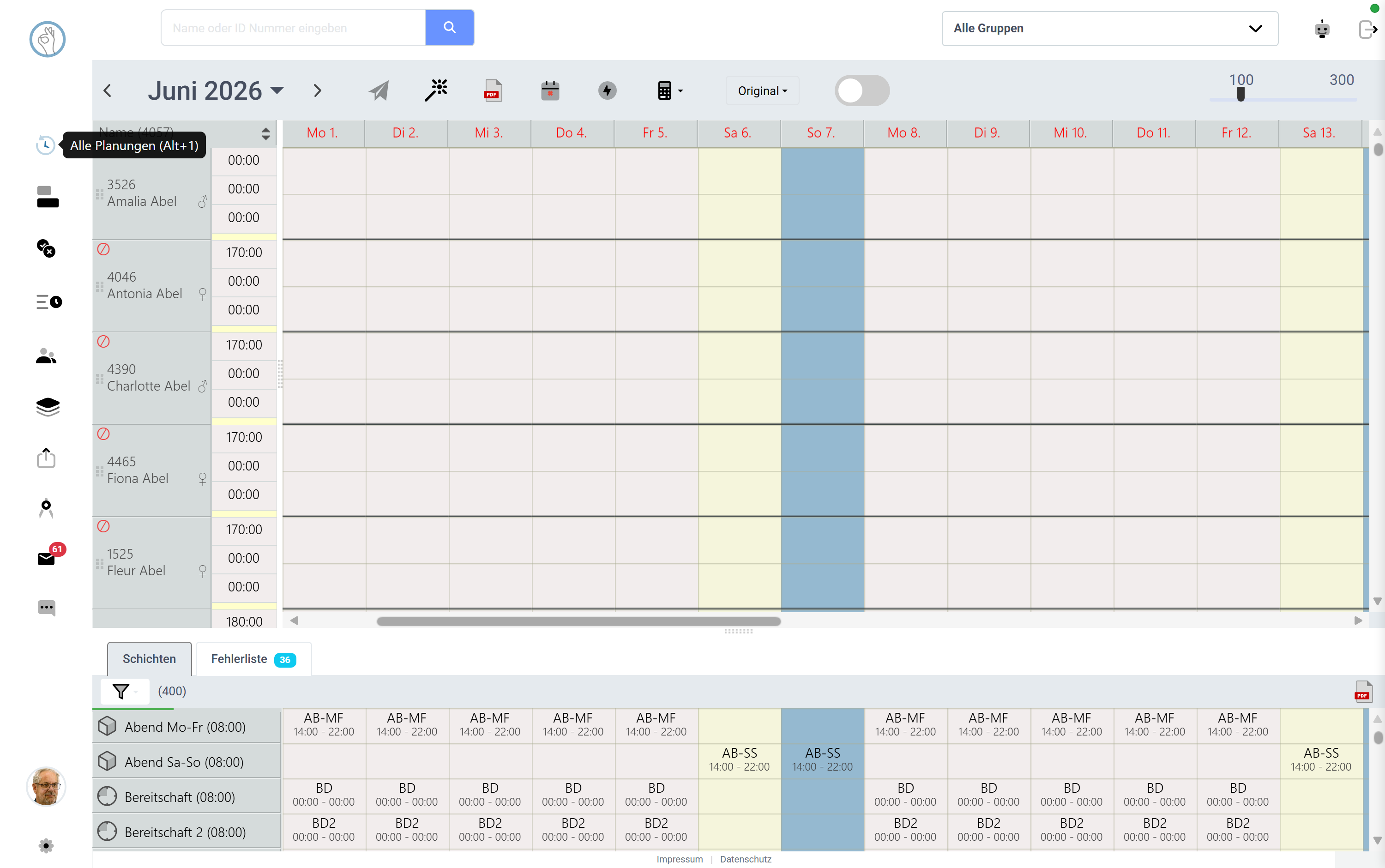 Screenshot shown in German — the app itself is available in English.
Try it yourself: Klacks Playground — login admin@test.com / P@ssw0rt1, data resets daily.